logo
For Power BI
  • Products
    • Custom Visuals for Power BI
    • Report Templates
  • Resources

      Resources

    • Documentation
    • Report Examples
    • Blog
    • Webinars
    • Video Tutorials
    • Visuals Gallery

    Support

    • ZoomCharts Assistance
    • Contact Sales
    • Contact Support
    • FAQ

    Challenges

    Challenges

    Improve your report creation skills by participating in free challenges for report creators.

    Learn more
    Get Developer License
  • Services
    • Power BI Report Development
    • Custom Visual Development
  • Challenges
  • Pricing
    • Custom Visuals for Power BI
    • Report Templates
Request a quote Get Developer License Sign in
Request a quote Book a Demo Get Developer License Sign in
Get it now
Go back

Contents

Go back

Feb 26, 2020

Sales overview by product and sales representatives: sample report

Get inspired! Take a look at this sample report and find new ideas for sprucing up your own sales reports in Power BI. Check out interactions, chart...
Title image
Title image

Get inspired! Take a look at this sample report and find new ideas for sprucing up your own sales reports in Power BI. Check out interactions, chart...

Contents

Share this article

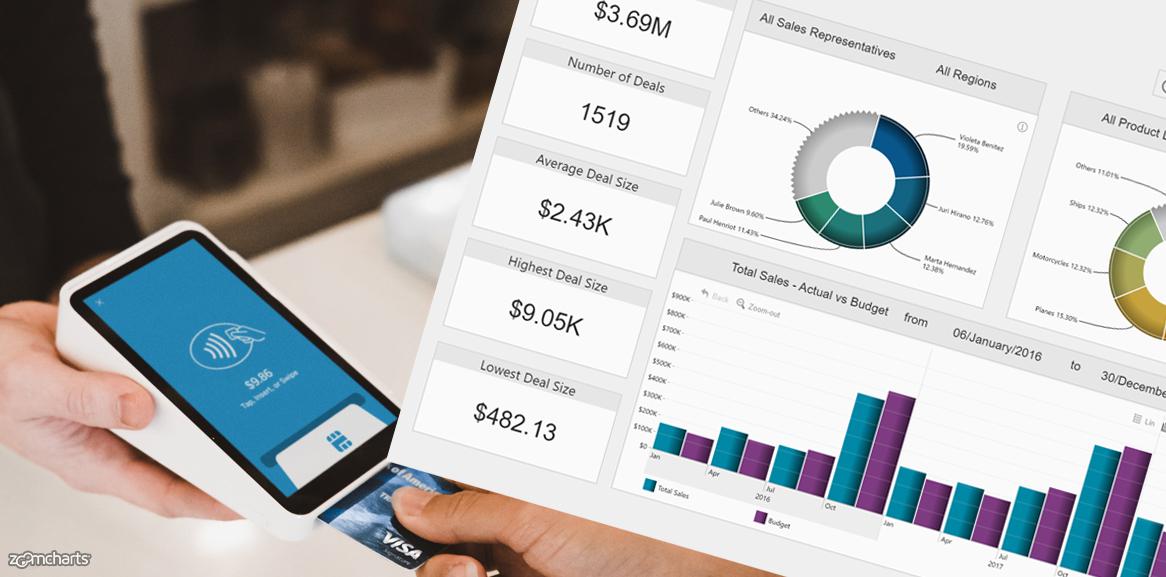
Get inspired! Take a look at this sample report and find new ideas for sprucing up your own sales reports in Power BI. Check out interactions, chart combinations and cross-chart filtering.

 

Try these interactions:

On the Sales Overview page

  1. Click on one of the two donut charts to filter the report by either seller or product line. Click on the center of the donut to go back.
  2. Click on the "Others" slice to see the rest of categories. Click "Previous" slice to go back.
  3. Click on one of the columns in "Total sales vs Budget" chart. It will filter report and drill down to a smaller time unit.
  4. Click and drag on the x-axis of "Total sales vs Budget" chart" to highlight a certain time period and filter report based on the selection.

On the Sales Team page

  1. Click on the image of one of the sales representatives.
  2. Click on one column in the column chart to filter results by product category.
  3. Clear filters.
  4. Right click on one of the columns in the " Sales by Product Line" chart. Slect Drill-through --> Deal overview to open detailed tabular view of the deals.

On the Product page

  1. Click on the columns in the column chart to drill into next level of data.
  2. Click on the area chart to drill down to a smaller time unit.
  3. Click "clear filters" afterwards
  4. Click and drag on the x-axis of the area chart to to highlight a certain period and filter the results based on the selection.
 
Noticed something you would like to include in your reports? See a room for improvements? Share it in the comment section!
 
Want to build such interactive reports yourself?
Sign up to our webinars, where our friendly product specialist Aivis Pavlovs will share the essentials, tips&tricks and best practices.



envelope icon

Want more info like this?

Subscribe to our newsletter and be the first to read our latest articles and expert data visualization tips!
Find out more

Nov 01, 2023

Blog Thumbnail
Customer stories

Customer Story: How Intel Uses ZoomCharts for Global Supply Chain Management

Intel develops technology that increases the performance and efficiency of computers and other devices. ZoomCharts creates data visualization technology that increases the efficiency and user adoption of Intel’s state-of-the-art business intelligence infrastructure.

Sep 28, 2023

Blog Thumbnail
ZoomCharts guides

Drill Down Network PRO vs. Graph PRO: A Detailed Comparison

In this article, we explain the main differences between Network PRO and Graph PRO visuals, and compare them head-to-head.

Aug 07, 2023

Blog Thumbnail
ZoomCharts guides

Drill Down TimeSeries PRO vs Timeline PRO: Differences Explained

This article explores the similarities and differences between TimeSeries PRO and Timeline PRO to help you decide which of our two Power BI visuals for time-based data is for you.

Jul 05, 2023

Blog Thumbnail
Power BI tutorials

Power BI Drill Down: The Ultimate Guide

In this article, we’ll explain what are drill downs in Power BI, and give you some tips and practical examples on how to correctly implement them and make your reports more interactive.

Aug 24, 2023

Blog Thumbnail
Power BI tutorials
Data visualization

Power BI Chart Types: Choosing the Right Visuals for Your Data

Power BI chart types can make a big difference in the effectiveness of your report. In this article, you'll learn about the different types of charts available in Power BI and how to select the most appropriate one for your data.

Jan 13, 2025

Blog Thumbnail
Power BI tutorials
Data visualization

Top 5 Power BI Report Design Mistakes You Should Avoid

Ideally, Power BI report design should make data exploration faster, easier and more efficient. But things do not always go according to plan, and certain design mistakes may creep up. Here are five of the most common mistakes that you should avoid when designing your reports!
  • «
  • 1
  • ...
  • 5
  • 6
  • 7
  • 8
  • 9
  • 10
  • 11
  • 12
  • 13
  • 14
  • »

Contents

Share this article

Want more info like this?

Subscribe to our newsletter and be the first to read our latest articles and expert data visualization tips!

Thank you!

Check your inbox to verify your email address.

logo
[email protected]
+44 204 577 3993
logo

Products

Drill Down Network PRO Drill Down Waterfall PRO Drill Down Graph PRO Drill Down Combo PRO Drill Down Combo Bar PRO Drill Down Donut PRO Drill Down Pie PRO Drill Down TimeSeries PRO Drill Down Timeline PRO Drill Down Map PRO Drill Down Scatter PRO All Visuals

Resources

Report Examples Webinars Blog ZoomCharts Academy Visuals Gallery Documentation Custom Visual Development Subscribe to News

Solutions

Custom Visual Development

Company

Pricing About Us Partners Leave feedback Join PowerGroup EU Funding

Help

ZoomCharts Assistance Contact Sales Contact Support FAQ

Drill Down Network PRO Drill Down Waterfall PRO Drill Down Graph PRO Drill Down Combo PRO Drill Down Combo Bar PRO Drill Down Donut PRO Drill Down Pie PRO Drill Down TimeSeries PRO Drill Down Timeline PRO Drill Down Map PRO Drill Down Scatter PRO All Visuals

Report Examples Webinars Blog ZoomCharts Academy Visuals Gallery Documentation Custom Visual Development Subscribe to News

Custom Visual Development

Pricing About Us Partners Leave feedback Join PowerGroup EU Funding

ZoomCharts Assistance Contact Sales Contact Support FAQ
+44 204 577 3993
[email protected]

Ready to get in touch?

Contact our experts with any question about Power BI and ZoomCharts for Free!

Contact us

© 2026, Data Visualization Software Lab

U.S. Patents No. 11,645,343; 11,921,804; 12,346,389

Cookies
Privacy Policy
Global
Legal
Patent
warning

Error message

success

Success info: Done!

ZoomCharts AI Assistant

We noticed you're using an old OS version.

For the best experience, we recommend upgrading to ensure that all website features display correctly.

Cookie settings

We use necessary cookies for site functionality, as well as statistic, marketing, and preference cookies to enhance your experience. For more information and to manage your preferences, please visit our Cookie policy